How to integrate Zapiet with DoorDash on your Shopify store
News
May 23, 2024
Anna Shevchenko
One strategy to help you stand out from the competition is a reliable and fast delivery service. More than 70% of online shoppers choose the store or restaurant that offers delivery, even when that establishment is more expensive.
At Zapiet, we strive to deliver exceptional service by considering every detail in advance, which is why we have teamed up with DoorDash Drive. For Shopify store owners, integrating Zapiet with DoorDash can streamline the delivery process and operational efficiency.
Why Integrate Zapiet with DoorDash?
By combining the robust store pickup and delivery solution from Zapiet with the reliable delivery service from DoorDash, you gain numerous benefits:
- Better delivery management: streamline order fulfillment and delivery processes.
- Contribute to your customers’ satisfaction: provide timely and efficient delivery options.
- Operational efficiency: reduce manual handling of delivery logistics.
How to integrate Zapiet with DoorDash on your Shopify store?
If you're based in the United States, Australia or Canada, let's walk through a step-by-step guide to set up the Zapiet x DoorDash integration!
Install and Configure Zapiet
- Go to the Shopify App Store and search for Zapiet - Pickup + Delivery.
- Click Add app and follow the prompts to install it on your Shopify store.
Configure Zapiet Settings:
- Open the Zapiet app in your Shopify admin.
- Follow our easy set up wizard to configure your store's pickup, delivery and shipping options.
- Set up your locations with accurate address details for delivery purposes.
Create a DoorDash account
Before activating the integration, you need to create a DoorDash account.
- Fill in the form that you will find in this article. You should receive a confirmation email that your account was created within an hour.
- After you get a confirmation email, you need to contact Zapiet support on chat to get your DoorDash Drive API Key.
Integrate DoorDash with Zapiet
- Navigate to the Zapiet app in your Shopify admin.
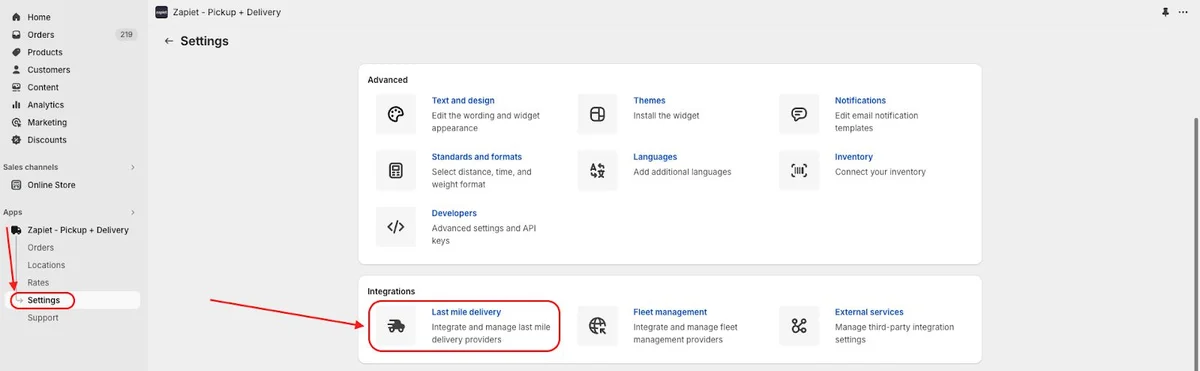
- Go to the Settings tab and find the Last-Mile Delivery section.
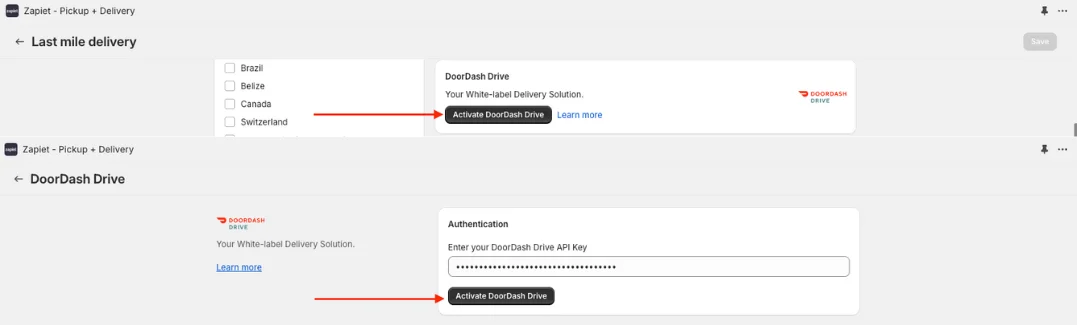
- Click Activate DoorDash Drive.
- Enter your DoorDash Drive API Key and click Activate DoorDash Drive.
- Add your Restaurant name.
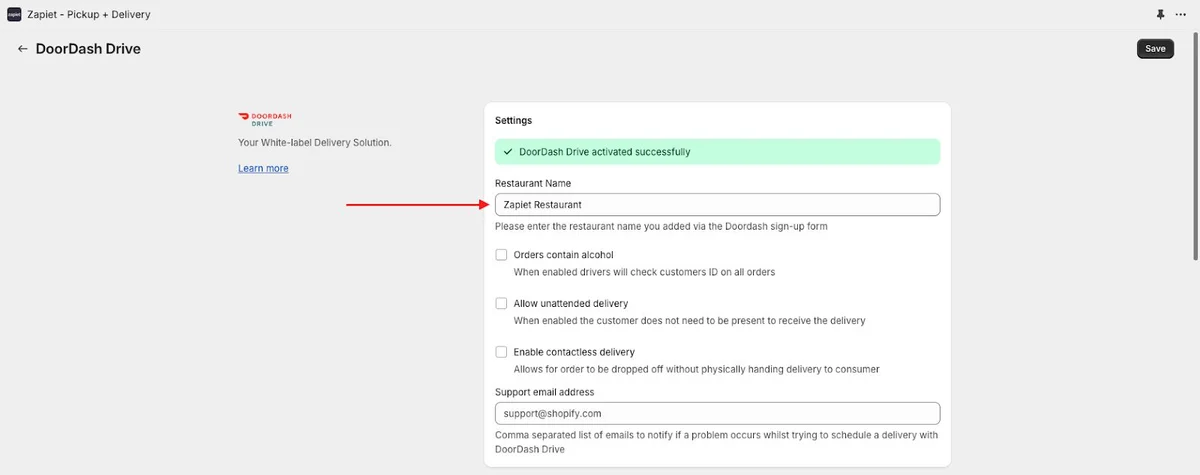
- Use the Restaurant name that you entered when filling in the DoorDash form. You should also receive it in the confirmation email from DoorDash.
- Click Save.
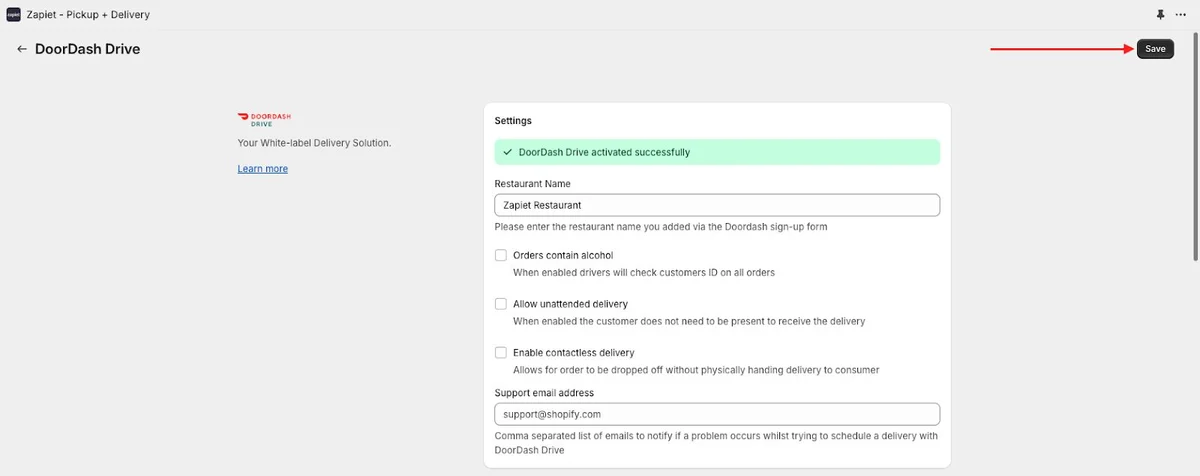
DoorDash Drive has now been activated—to finish setting up, you need to configure your settings: set your delivery zones, fees, and preferences for DoorDash deliveries within Zapiet.
Additional tips for a smooth integration
Support and Documentation:
- Refer to the Zapiet Help Center and DoorDash Support for detailed documentation and assistance.
- Contact Zapiet and DoorDash support if you encounter any issues during setup.
Regular Updates:
- Keep both apps updated to their latest versions to ensure compatibility and access to new features.
Integrating Zapiet with DoorDash on your Shopify store is a strategic move to boost your delivery capabilities and customer satisfaction. By following this guide, you can achieve seamless integration, ensuring your customers receive their orders promptly and efficiently. For even more information on integration, read our Help Article.
It's time to press the start button and move towards a customer-centric and reliable service!
Share this post
